# clean your mac without chaos

Pause your Mac.
Clean it. Unpause.

Mac Pause is a tiny menu bar utility that temporarily suspends your keyboard and trackpad — so you can wipe down your Mac without triggering keys, clicks, scrolls, or volume changes.

free · macOS 13+ · Apple Silicon & Intel · zero network connections

# how it works

Three steps. No shutdown, no lock screen.

01 · start

Pick a session from the menu bar

Start Cleaning, or grab a preset — Quick Wipe (15s), Desk Reset (30s), Deep Clean (60s).

02 · hands off

A short countdown, then input pauses

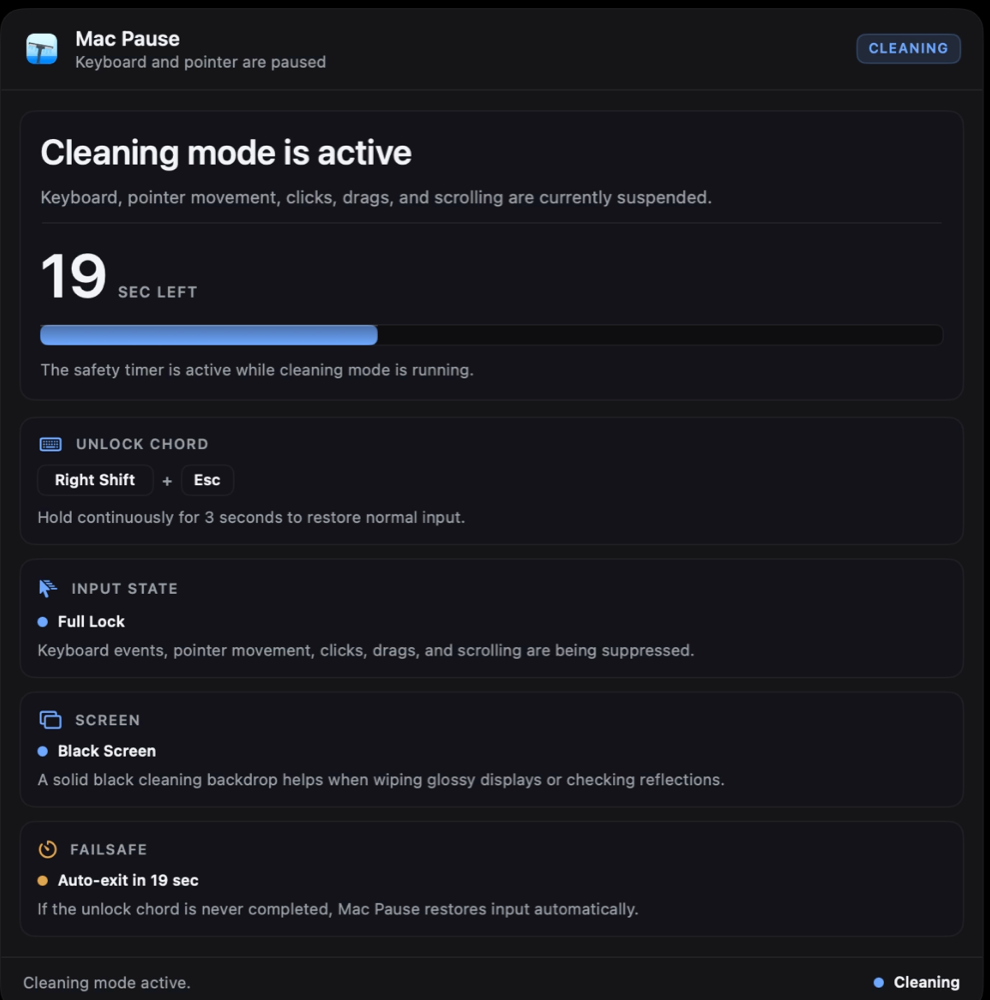
After the arming countdown, every key press, click, scroll, drag — even volume, brightness, and media keys — is suppressed while you clean.

03 · unpause

Exit on purpose — or automatically

Hold Right Shift + Esc for two seconds to end the session. Forget the chord? The failsafe timer restores input on its own.

# what's inside

Small app. Considered details.

Three lock modes

Full Lock pauses everything. Keyboard Only keeps the pointer alive. Pointer Only frees the keys.

Cleaning backdrops

Solid black, gray, or white full-screen backdrops make smudges and dust visible while you wipe the display.

Failsafe timeout

Every session ends automatically — 15 to 90 seconds, your choice. It is impossible to get stuck.

Presets

Quick Wipe (15s), Desk Reset (30s), Deep Clean (60s) — one click from the menu bar.

Media keys too

Volume, brightness, and playback keys ride a separate macOS event path. Mac Pause blocks those as well.

Launch at login

Optional login item, managed with the native macOS mechanism. Ready before your first coffee-and-wipe.

# built to never trap you

An input blocker you can trust.

An app that suspends your keyboard has to earn its permissions. Mac Pause is built around one rule: there is always a way out.

The failsafe is always on

Every session carries a hard timeout. Even if you walk away, input restores itself.

Unlocking is deliberate

A two-second hold of Right Shift + Esc — not a tap you can trigger while wiping the keys.

Hardware is never touched

Events are suppressed in software while a session runs. If the app dies, macOS restores input instantly.

Zero network connections

No analytics, no accounts, no phoning home. The app never opens a network connection. Neither does this site.

why macOS asks for two permissions
Accessibility required

Lets Mac Pause suppress keyboard and pointer events during a session. This is the standard macOS mechanism — the same one window managers and automation tools use.

Input Monitoring required

Lets the app see exactly one thing while blocking: whether the unlock chord is being held. Nothing is logged, stored, or sent anywhere — there is no network code in the app.

Both are granted in System Settings → Privacy & Security. The app walks you through it on first launch.

# install

One dmg, then done.

Version 1.0.0 · about 3 MB · universal binary

  1. 1
    Download and open the disk image.

    MacPause-1.0.0.dmg — nothing else inside, no installer.

  2. 2
    Drag Mac Pause into Applications.

    Launch it from there — if you skip this, the app offers to move itself.

  3. 3
    Grant the two permissions.

    The setup window opens automatically and walks you through both toggles.

Download Mac Pause 1.0.0
verify the download
$ shasum -a 256 ~/Downloads/MacPause-1.0.0.dmg

Compare the output against the checksum published next to each release. Every release ships with its own .sha256 file.

# questions

FAQ

Why does it need Accessibility and Input Monitoring?

Suspending input on macOS works by intercepting events, and Apple gates that behind these two permissions — there is no lighter way to do it. Accessibility lets the app suppress events; Input Monitoring lets it see the unlock chord while blocking. Mac Pause contains no network code, so nothing it sees can leave your machine.

What if I forget the unlock chord or walk away?

Nothing bad. Every session has a failsafe timeout (15–90 seconds, you choose). When it expires, input is restored automatically. There is no code path that blocks input without a running timer.

Does it disable my keyboard hardware?

No. It suppresses events in software only, while a session is active. If the app quits, crashes, or is killed, macOS delivers input normally again immediately.

Does it work with external keyboards, mice, and displays?

Yes. Blocking happens at the session level, so built-in and external input devices are covered, and the cleaning overlay spans every connected display — including ones you plug in mid-session.

Why is it not on the App Store?

App Store apps are sandboxed, and the sandbox does not allow the global event interception this app exists for. Mac Pause is a signed direct download instead.

What does it cost?

Nothing. Mac Pause is free.